Open any file, any size, anywhere.
See what it actually is. Together.

Open a file of any size where it already lives, understand its format, and work on it together, without uploading it anywhere. A 3 GB video or a 40 GB firmware image opens in a browser tab in seconds, because nothing is read until you look at it.

No install · No account · Your file never leaves your machine

Why it exists

Some data is too big, too sensitive,
or in the wrong place to move.

Moving it costs time, money and permission. Looking inside it shouldn’t. ByteSlicer brings a format-aware interface to the bytes, instead of bringing the bytes to a tool.

Too big

Tens to hundreds of gigabytes

Video masters, disk and firmware images, sensor recordings. Downloading one to look at a few kilobytes of it is the normal workflow today.

Too sensitive

Owned by someone else

Customer files, NDA material, evidence with a chain of custody. Uploading to a third-party service is often simply not allowed.

In the wrong place

Cloud storage, a remote office

Files sitting in S3, behind a restrictive network, or in another country. Egress fees and blocked services make moving them slow and expensive.

Working today

A 3 GB video opens in seconds,
and a colleague opens it from another machine.

Only the parts someone looks at are read. Sessions start from an invite link, survive the host leaving, and can be recorded and replayed.
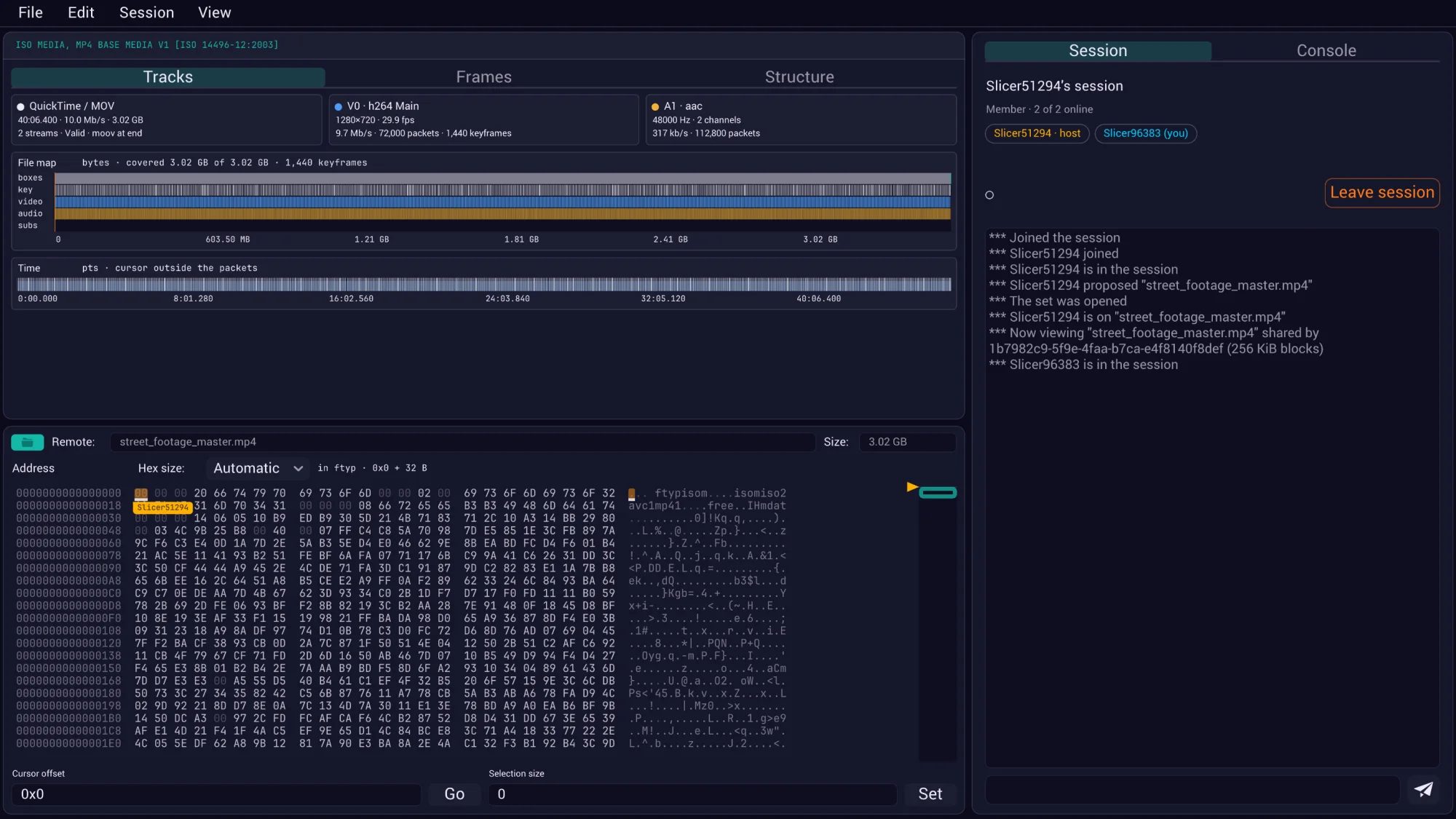
ByteSlicer in a browser, viewing a 3.02 GB MP4 shared by another machine: the tracks, a file map of boxes, keyframes, video and audio, a time map, and the hex view below; a session panel on the right lists the two members.
The second person’s view, in a browser. The file stays on the holder’s machine, and the blocks they look at arrive peer to peer.
3.02 GB real H.264 file, opened in 3.6 s 8 GiB verified in Chrome and Safari 256 KiB blocks, fetched only when looked at 0 installs, 0 uploads
3.6 sto open a 3 GB file in a browser tab
0bytes uploaded, by construction
4.3 MBthe entire app: engine, UI, networking
1link to send; nothing to install for anyone
Video

It understands the file,
not just its bytes.

Tracks, packet and time maps, decoded frames, GOP structure, motion vectors and quantization, all drawn over the exact bytes they come from. The decoder runs where the file is, so the other people in the session see frames without having the file or the decoder.

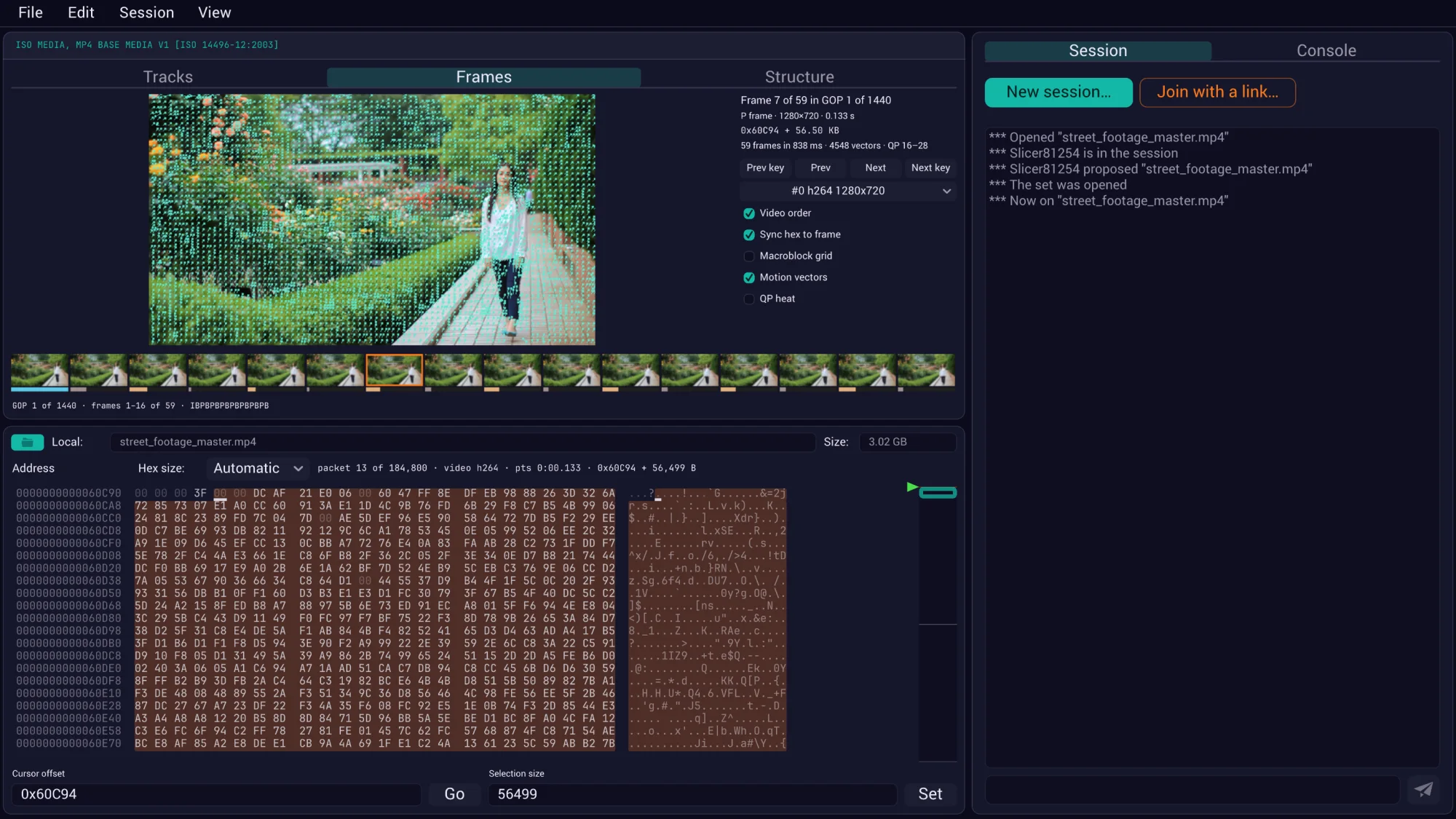
The Frames tab: frame 7 of a 1440-GOP H.264 file with motion vectors drawn over the picture, a strip of GOP thumbnails below, and the hex view synced to that frame's 56 KB packet.
Frame 7 of the 3 GB file with its motion vectors, the GOP strip below, and the hex view synced to the exact bytes of that frame.
Shipped

From “QC says it fails” to “here’s why”

A batch checker tells you a file is broken. This shows you the misplaced index, the odd packet, the frame that doesn’t decode, in place, next to the bytes.

Shipped

Decoders that arrive on demand

H.264 and HEVC decoding ships as a module that loads only when a session needs it, in an isolated worker. Motion vectors and QP heat for H.264 today; more codecs follow the same path.

Edits a video tolerates without re-encoding

Trims by edit list, rotation and color flags, faststart, GOP-aligned repair, track operations: all table and box rewrites, each recorded as a small edit rather than a new copy.

Any format

Firmware, executables, disk images: the same interface.

Media comes first; the same engine reads anything that can be described. A format description turns the flat bytes into a navigable tree, with the hex view and the tree linked in both directions.

  • 180+ formats out of the box. ByteSlicer runs .ksy descriptions from the Kaitai Struct gallery: ELF, PE, Mach-O, PNG, ZIP, filesystems, partition tables, boot images and far more.
  • Our own interpreter, built for hostile input. Every format is someone else’s code and every file someone else’s data, so parsing runs sandboxed, with budgets on time and memory, in its own process natively and its own worker on the web.
  • Your format, in an afternoon. Describe a proprietary header declaratively and import it; no plugin build, no fork of us. Anything deeper is a WebAssembly module, the way our own video decoder already ships.
  • Parsed once, where the file is. The tree is computed on the machine that has the bytes and shared to everyone in the session, like the media model.
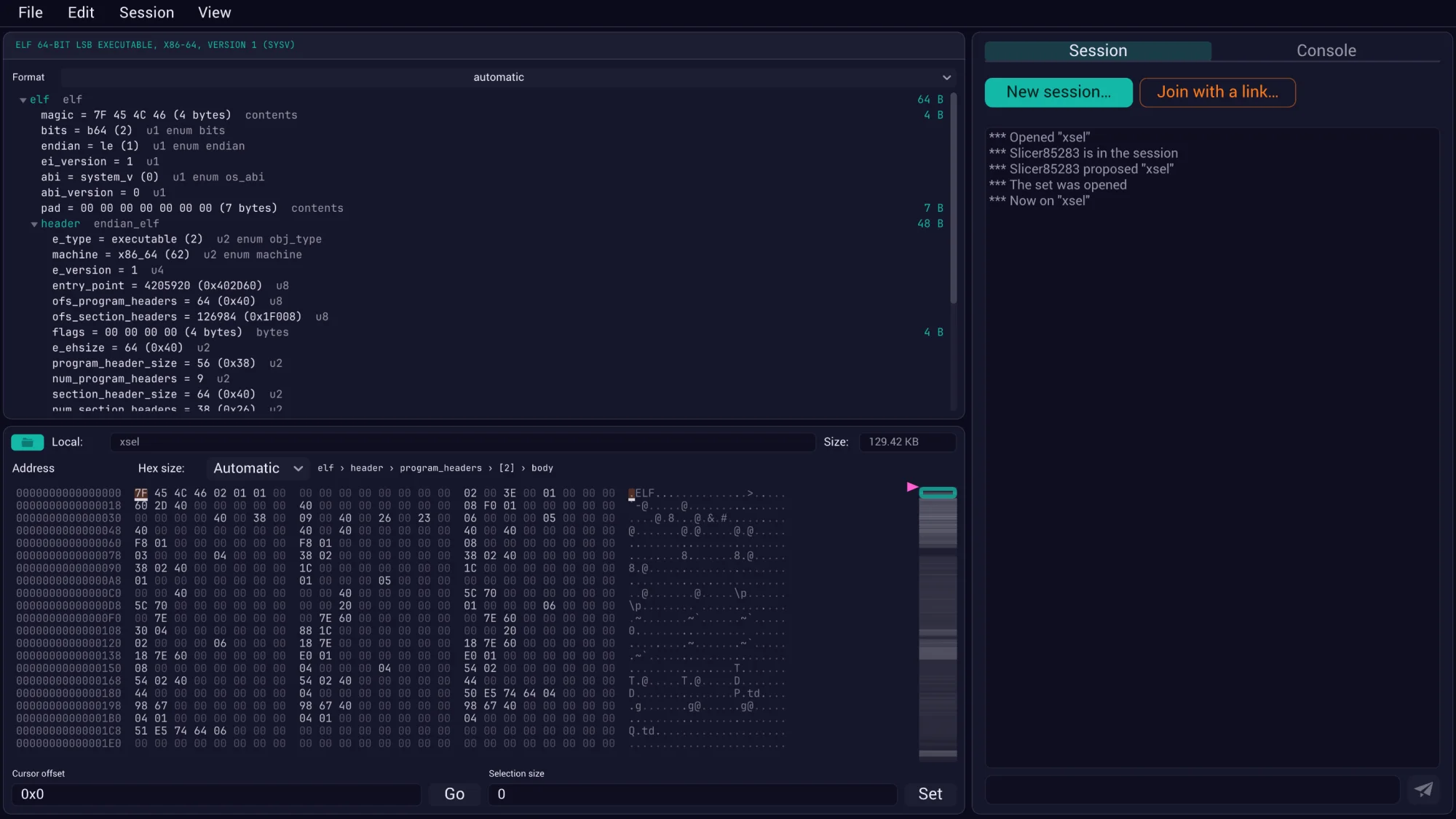
An ELF executable opened in ByteSlicer: the structure tree names the header fields, program headers and section headers, and the hex view below shows the bytes with the cursor's field named in a breadcrumb.
An ELF executable, parsed by the gallery’s description. The breadcrumb above the hex names the field under the cursor.

Together

Send an invite, and they’re in your file.

Same offsets, same structure tree, same frames, each other’s cursors moving live. The person joining doesn’t have the file and never gets a full copy of it: the blocks they look at stream from your machine to theirs, peer to peer, as they scroll.

  • One person is enough. Open a file and you are in a session of one. Sharing it is a link, and the link is how it spreads, not the price of entry.
  • Folders too. Drop in an extracted firmware tree or a sample set. Nothing inside is read until it is expanded, and a file can be requested from its holder, who says yes or no.
  • Sessions outlive the host. If the holder leaves, everything already replicated stays; new bytes wait for a holder. Sessions can be recorded, saved and replayed.
  • Nothing in the middle. Bytes go directly between people. Our servers introduce you and then get out of the way, which is also why there is nothing for us to leak.
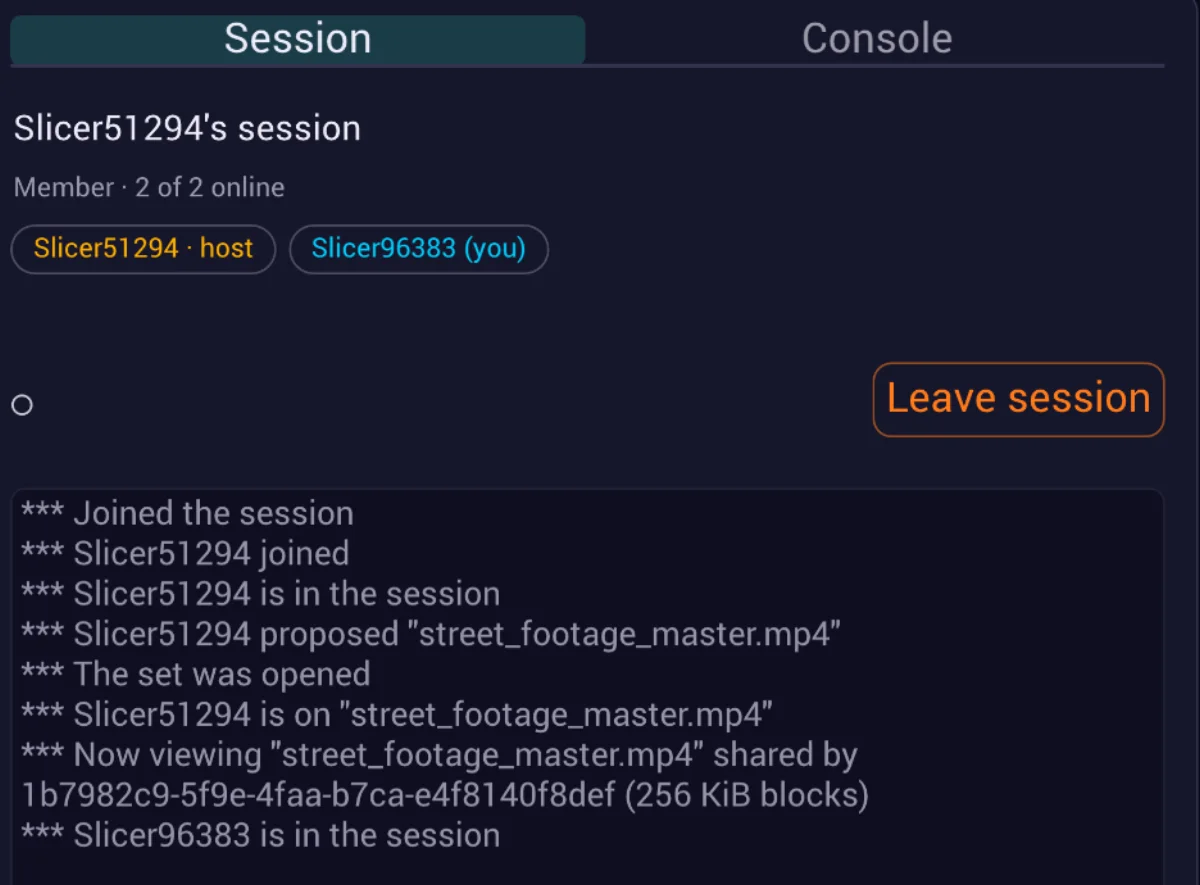
The session panel: two members online, the host and you, a leave button, and the log of the file being proposed, opened and shared in 256 KiB blocks.
The session panel from the screenshot above: who is in, who holds the file, and what happened.

Remember

Your file is never modified.
Your work is never lost.

Edits aren’t written over the original; they’re recorded. Every change carries its author, the record is kilobytes rather than gigabytes, and the original is bound to it by its content hash. Think of it the way Lightroom thinks of a photograph: the raw file is never touched, and the catalog is what becomes valuable.

Shipped

Undo, save, replay

Every edit is an entry; a session can be saved beside the file it describes and replayed later, by anyone who has the original.

Shipped

Export as a patch

A git binary patch, applied with git apply and nothing of ours, for files up to 4 GB. The original is never loaded whole to produce it.

Fork, merge, time travel

Two people patch different regions and the records combine. Reconstruct the file as it stood at any point, from a command line too.

Encrypted persistent history

Notes say things like “AES key at 0x4F00”, so the record is encrypted before it is stored anywhere. Designed in from the start.

The direction

The peer doesn’t have to be
a person’s machine.

It can be a VM sitting next to the data. An engineer opens a browser anywhere and immediately gets a format-aware interface to a file in the company’s own cloud, without downloading it. One person is enough; colleagues join through the same link.

THE CUSTOMER'S CLOUD Storage S3 · GCS · NAS Engine VM next to the data only what is looked at ● Engineer, any browser ● Colleague, same link ● An AI agent, as a peer nothing to install joins live planned: queries the model

LucidLink brings the bytes to your apps. This brings a format-aware app to the bytes.

VM host works today with manual steps · not yet productized

AI as one of the peers

An agent joins the session like a colleague and queries the format model, not the raw bytes. Its fixes land in the same edit record as anyone’s, where a person reviews, undoes or exports them. “Why won’t this file play?” becomes a question it can answer.

Never uploaded

The reason you’re allowed
to use this at all.

A customer’s master is under contract. Client firmware is under NDA. Malware samples breach terms of service. A forensic image is evidence with a chain of custody. For most of the people who need to look inside a file together, “upload it to our cloud” ends the conversation. So we don’t.

YOUR MACHINE, OR A VM NEXT TO THE DATA master .mp4 40 GB Read a block at a time. never copied never moved blocks you look at peer to peer hash-checked YOUR COLLEAGUE Scrolls the same file. holds no copy of it sees only what they open FUTONICA Introduces you, then gets out. never sees the file never holds its bytes edits, with their author the same record, replicated The edit record: the only thing that ever persists kilobytes · bound to the original by its content hash · exportable as a patch Your disk, or your git remote yours to keep, readable without us
The file

Stays where it is

Read block by block from the machine that has it. No copy, no cache on anyone’s server, no “temporary” upload that quietly persists.

The blocks

Move peer to peer

When a teammate scrolls, the blocks they’re looking at travel straight from your machine to theirs, checked against a hash on arrival. Our servers only make the introduction, or yours do, when you run your own.

The record

Readable without us

Open format descriptions, a saved session you can replay, and edits exported as a patch you apply with git. Nothing is in a format you need us to read.

Who it’s for

People whose files can’t leave the building.

Video platforms & post-production

Support and QC engineers with a master in cloud storage that fails a check or won’t play. Open it where it sits, see why, and show the colleague who has to fix it.

Firmware, malware & RE teams

Consultancies auditing client hardware under NDA, and samples that breach terms of service the moment they touch a third-party cloud, worked on by people who need the same offset in view.

Digital forensics & IR

Evidence images that must not move, and an attributable record of who examined what and when: the shape of a chain-of-custody argument.

Broadcast & archives

Terabytes of masters that are already stored remotely. The one that is damaged, mislabeled or oddly muxed gets inspected without anyone downloading it first.

Protocol & format archaeology

Undocumented save files, proprietary telemetry, ancient disk images. The work is guessing a structure together and writing it down as you go.

Anyone the cloud turns away

Files too big for any upload box, networks filtered by protocol or geography, services blocked in the country the file is in. A direct link between two machines has nobody in the middle to say no.

The honest comparison

Great tools exist for each piece.
None opens a broken file where it sits, with someone else.

The tools below are excellent at what they do, and we use several of them. What none of them does is put a format-aware interface on a file in place and a second person in it with you, because that is a commitment in the data model, not a feature to bolt on.

Category Examples What they do well What’s missing
Bitstream analyzers Interra VEGA, Elecard StreamEye Deep codec-level analysis Desktop software, local files, one person
Batch QC in your cloud Interra BATON, Venera Quasar, Telestream Qualify Automated checks at scaledeployed in the customer’s account Says a file fails, not interactively why
Players next to storage Telestream GLIM, Accurate.Video Play huge masters in a browserwithout downloading them The picture only, no structure
File streaming LucidLink, Shade Any app works on remote files Moves bytes; no analysis
Hex editors ImHex, 010 Editor, HxD Years of single-player depthImHex’s pattern language, 010’s templates Load the whole file, or desktop only; one person
Disassemblers Ghidra, IDA, Binary Ninja Code, with team databasescollaboration through a merge A different problem, after an import step
ByteSlicerfutonica Interactive, format-aware, in place, shared From “it fails” to “here’s why”on the file where it sits, together, with the edit recorded

We don’t claim the deepest analyzer

Elecard and Interra have decades of codec work, and ImHex is free and excellent. We compete where a desktop, single-player tool structurally cannot follow: in place and together.

We do claim a workflow built for big files

Not just that a 3 GB master or a 40 GB image opens, but that everything after it stays fast. Paging, navigation, structure and sharing are all built around never holding the whole file.

And your data stays yours

The file never moves. The record is yours to keep, in formats you can read without us: open format descriptions, a replayable session, a patch that git applies.

Plans

Pay only for what you need.

The free plan has to be good enough to be your default tool, or it isn’t doing its job. What costs money is what outlives a sitting, and what runs next to your storage.

Free

Free, forever
Individuals and small teams
  • Any file size, native and web
  • Video containers: tracks, packet and time maps
  • 180+ formats and the structure view
  • Files and folders, shared by a link
  • Edits and undo, exported as a git patch, for files up to 4 GB
Open ByteSlicer →

Pro

$10 / month
Working professionals
  • Everything in Free
  • Video codecs: decoded frames, motion vectors, QP
  • History that persists between sessions
  • Recorded sessions you can reopen later
  • Fork, merge and time travel, as they ship
  • Edits past 4 GB, with our own patch format and CLI tools
Start with Free →

Business

Contact us
Teams with files next to their storage
  • Everything in Pro
  • A host running next to your storage
  • Viewers for your proprietary formats
  • Self-hosted and air-gapped, on your own server: available for pilots now
  • SSO, audit logging, invoicing

Introductory pricing, in USD. ByteSlicer is early: the prototype is free and open to anyone right now, and the paid plans arrive as the capabilities above do.

Right now, in this browser

Try it yourself.
Bring a big file
and invite a colleague.

Open the prototype, pick the largest video or binary on your disk, and watch it appear. Then send someone the link and look at it together. Nothing installs and nothing uploads.

Open ByteSlicer →

futonica.com/byteslicer